

Field Day PBX
SIP phones, conference bridges, AllStar integration, and the Asterisk config files that made it work.

This is a followup (more of a sidebar, actually) from May’s article about the Field Day network. We’ll be going into the phone side of the network and how to set one up for your Field Day site, EMCOM communications trailer, or just a way to add some interesting features to your Allstar based repeater.
Allstar on a Raspberry Pi
I started off with the standard ASL3 Appliance image available at AllstarLink.org. I’m using a Pi CM4 with onboard eMMC storage. The board I’m using, the Tofu, is from a Swiss company called Oratek. This board is really nice because it can accept a very wide range of DC input from a coax power connector or two pin screw-down connector. It also includes an M.2 slot on the bottom, on which I installed an LTE modem. For an extra $8 they sell the .stl files for a case, which is functional but the top and bottom plates are pretty thin, so if you go this route make sure to bump up the infill to 75% or higher. I used standard PLA, so it will probably melt a little in a hot vehicle too (Update: It did melt pretty badly, along with the hot glue I used to hold things together).
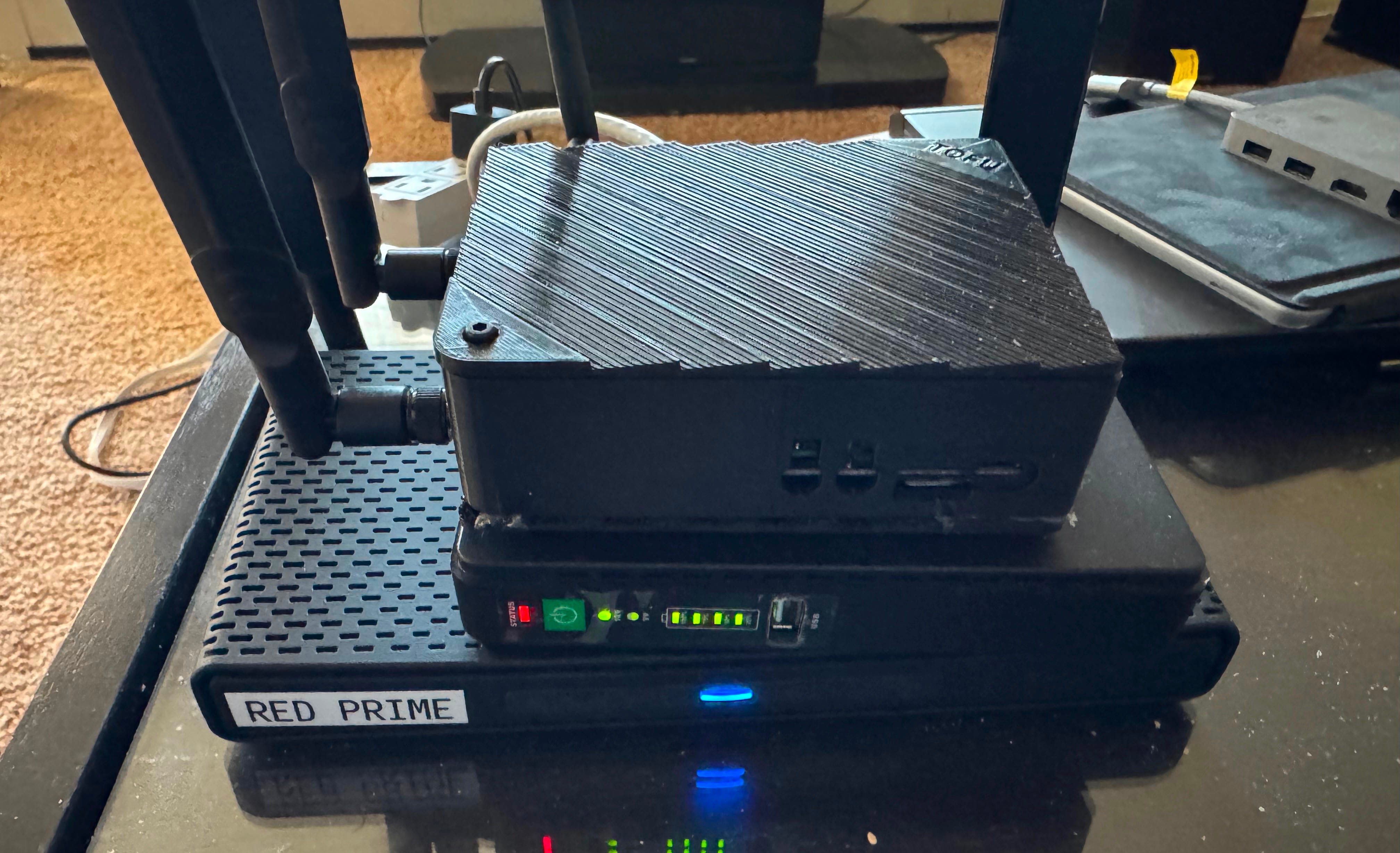
The setup is powered by a DC-DC power supply that can provide 24VDC to run the MikroTik hAP3 router and mANT access point (on POE passthrough), and +12 to run the server. It also has a set of 18650 LiPo cells to keep the system powered up for some time if the primary power from my Ecoflow solar battery runs out. The Starlink Mini will be powered by its supplied 120V power brick because I’ve had issues with running it on the DC power supplied by the Ecoflow. I was using a USB-C PD adapter that should be supplying enough power to the Starlink terminal, but I’ve had some problems that look a lot like brownout issues that disappeared after I went back to the wall wart supplied.
Post mortem: Yes, the small UPS did a fantastic job at keeping the network up, even when I had a low power situation on Saturday morning because the Ecoflow alternator generator was off when I was driving up to the site and so I didn’t pick up anything but a short time of solar Friday evening. These units were also used at each tent to keep the network radios up when generators needed refueling but also in case of catastrophic power failures.
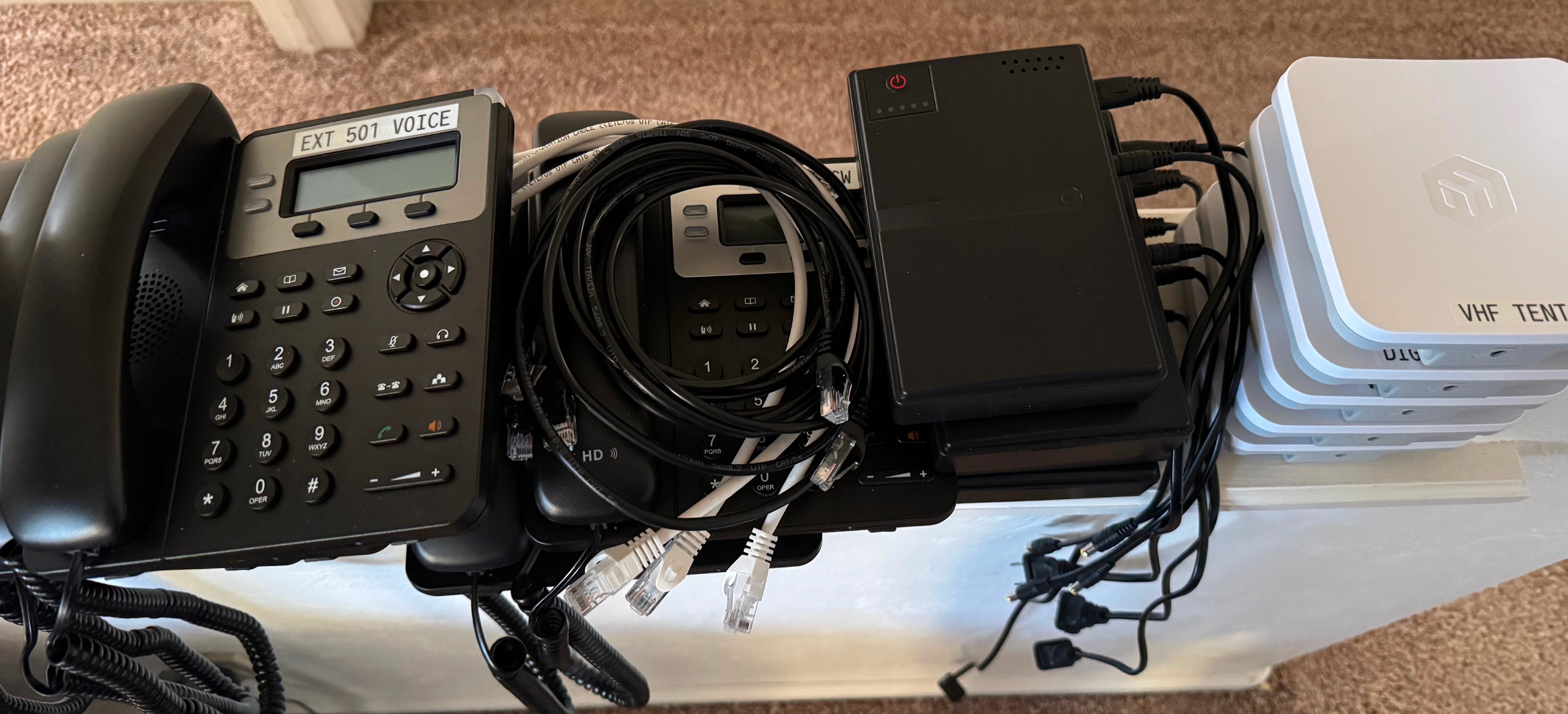
Allstar is of course based on Asterisk, the open source PBX software that drives thousands of office telephone systems. As such it’s fairly easy to add on the modules and configure it to become a full-featured PBX. For the Field Day site I set up six extensions: 501 - 505 will be the tent phones and 101 will be a WiFi phone for myself.
The phones I chose are Grandstream GXP1620 IP Phones. They seem to be fairly popular and are often sold as used or open box on Amazon, usually for under $40. I’ve been keeping an eye out for when they show up at a good price. They can be programmed with a web interface or front panel. The more advanced settings such as phone books and programmable keys need configuration files but the basics are good enough. On the Asterisk side, I followed the instructions in the Allstar manual for setting up SIP phones.
Post mortem: Next time I’ll have a checklist! The phone network itself was fine, but I forgot the box that had the stands for the phones, and the directory/how to use page, so they didn’t sit on the desks properly. And I envisioned they’d sit next to the backup power supplies so the power jumpers were only about 6 inches long. Longer power and ethernet jumpers will allow for many more placement options and the stands will put them front and center. We did get a few calls to each other and I think in time as people feel comfortable with them they’ll get more routine use.
Configuration file changes
Pjsip.conf, extensions.conf and dialplan.conf
Conference bridges.
Dialing extension 500 will send you to the conference bridge. This will be for group chats, coordinating operations such as who gets access to what bands, troubleshooting and general chit-chat. It’s always available but not necessarily active unless someone is actually connected to the Bridge. The configuration is remarkably simple.
Begin by editing /etc/asterisk/confbridge.conf
[site_bridge]
type=bridge
max_members=20
record_conference=no
[site_user]
type=user
music_on_hold_when_empty=no
announce_user_count=no
announce_join_leave=no
dsp_drop_silence=yes
denoise=yes
Then make the following addition to /etc/asterisk/extensions.conf
[sip-phones]
; 500 - Field Day site intercom conference
exten => 500,1,Answer()
same => n,ConfBridge(500,site_bridge,site_user)
same => n,Hangup()
This turns extension 500 into an always-available voice chat room. If two or more operators dial 500, they’re immediately talking to one another.
Because my long term plan is to use this remote node while in ares that don’t have cell service, I added it to my VoIP provider account as another extension. Any of the stations can dial out to the PSTN by dialing 9+phone number. After Field Day I’ll keep this set up so that I’ll have an autopatch on my node that can be used with a VHF/UHF radio.
More .conf changes
One thing that made it easy to do was keeping everything as boilerplate as possible. Once extension 501 was working, it was just cut/paste/modify for the additional handsets.
; Field Day extensions added 05-25-26
exten => 501,1,Dial(PJSIP/501,30)
same => n,Hangup()
exten => 502,1,Dial(PJSIP/502,30)
same => n,Hangup()
exten => 503,1,Dial(PJSIP/503,30)
same => n,Hangup()
exten => 504,1,Dial(PJSIP/504,30)
same => n,Hangup()
exten => 505,1,Dial(PJSIP/505,30)
same => n,Hangup()
exten => ${NODE},1,Ringing
exten => ${NODE},n,Answer(3000)
exten => ${NODE},n,Set(NODENUM=${CALLERID(number)})
exten => ${NODE},n,Playback(extension)
exten => ${NODE},n,SayDigits(${NODENUM})
exten => ${NODE},n,Playback(rpt/connected)
exten => ${NODE},n,Playback(rpt/node)
exten => ${NODE},n,SayDigits(${EXTEN})
exten => ${NODE},n,rpt(${EXTEN}|Pv)
exten => ${NODE},n,Hangup
; Allow SIP calls to local nodes
exten => 1998,1,rpt(1998|P)
exten => 1999,1,rpt(1999|P)
; Dial 9 + 10-digit number
exten => _9NXXNXXXXXX,1,Dial(PJSIP/1${EXTEN:1}@callcentric)
; Dial 9 + 1 + 10-digit number
exten => _91NXXNXXXXXX,1,Dial(PJSIP/${EXTEN:1}@callcentric)
; 500 - Field Day site intercom conference bridge
exten => 500,1,Answer()
same => n,ConfBridge(500,site_bridge,site_user)
same => n,Hangup()
; 14688 - Field Day site Sunlight repeater bridge
exten => 14688,1,Answer()
same => n,System(/usr/local/sbin/fd-repeater-bridge-up.sh)
same => n,ConfBridge(14688,site_bridge,site_user)
same => n,Hangup()
There are also settings added to /etc/asterisk/pjsip.conf:
; Field Day tent SIP phones - 05-25-26
[501]
type=endpoint
context=sip-phones
disallow=all
allow=ulaw
auth=501
aors=501
direct_media=no
[501]
type=auth
auth_type=userpass
username=501
password=*******
[501]
type=aor
max_contacts=1
remove_existing=yes
[502]
type=endpoint
context=sip-phones
disallow=all
allow=ulaw
auth=502
aors=502
direct_media=no
[502]
type=auth
auth_type=userpass
username=502
password=*****
[502]
type=aor
max_contacts=1
remove_existing=yes
…
(Extensions 503, 504 and 505 are identically configured)
Because this is very temporary and in a friendly environment I didn’t worry too much about locking down the phones. The tents were on their own subnet and SSID1 and isolated from the public access point (that I was going to have a simple landing page with links to the club’s site, ARRL.org and a page describing Field Day, but unfortunately ran out of time… next year). So simple user/passwords. If it becomes a permanent installation I’ll introduce more security.
The ability to dial out is made possible by the Starlink connection. The Asterisk PBX registers to Callcentric as an additional SIP extension:
; =========================
; Callcentric trunk
; =========================
[callcentric-auth]
type=auth
auth_type=userpass
username=*****************
password=; =========================
; Callcentric trunk
; =========================
[callcentric-auth]
type=auth
auth_type=userpass
username= (account phone number+extension)
password=(password)
[callcentric-aor]
type=aor
contact=sip:callcentric.com
[callcentric]
type=endpoint
transport=transport-udp
context=from-callcentric
disallow=all
allow=ulaw
outbound_auth=callcentric-auth
aors=callcentric-aor
from_user=(account phone number+extension)
from_domain=callcentric.com
callerid=”AllStar Autopatch” <account callerID number>
dtmf_mode=rfc4733
direct_media=no
rewrite_contact=yes
force_rport=yes
rtp_symmetric=yes
[callcentric-registration]
type=registration
transport=transport-udp
outbound_auth=callcentric-auth
server_uri=sip:callcentric.com
client_uri=sip:(account phone number+extension)@callcentric.com
contact_user=(account phone number)
retry_interval=60
forbidden_retry_interval=600
expiration=3600
[callcentric-aor]
type=aor
contact=sip:callcentric.com
[callcentric]
type=endpoint
transport=transport-udp
context=from-callcentric
disallow=all
allow=ulaw
outbound_auth=callcentric-auth
aors=callcentric-aor
from_user=(account phone number+extension)
from_domain=callcentric.com
callerid=”AllStar Autopatch” <account callerID>
dtmf_mode=rfc4733
direct_media=no
rewrite_contact=yes
force_rport=yes
rtp_symmetric=yes
[callcentric-registration]
type=registration
transport=transport-udp
outbound_auth=callcentric-auth
server_uri=sip:callcentric.com
client_uri=sip:(account phone number+extension)@callcentric.com
contact_user=(account phone number+extension)
retry_interval=60
forbidden_retry_interval=600
expiration=3600
Not the clearest thing to set up, but ChatGPT helped out a lot. In fact I highly recommend if you’re getting into the weeds of Asterisk and Allstar, keep a tab with ChatGPT open. It not only will generate the basic skeleton of the configuration changes, it will tell you exactly what it is doing and why.
Easy-peasy?
That’s about all there is to it. Who would have thought that a basic phone system could be so simple to set up? Now keep in mind there’s a lot missing. There’s no phonebook, none of the handset feature buttons were set up, the displays didn’t have the correct time, and only one extension could use the node to get to the repeater at a time. But for a first effort I think it is pretty impressive. And of course the hardest part was getting people interested in playing with it. One thing I can recommend is the Oratek Tofu carrier board for the Raspberry Pi 4 CM module. Yes, it is expensive. Yes, the 3D printed case is too thin and sags in the heat. But the wide range (and fused) power input right on board and M.2 key for SSDs or modems is pretty great. If you’re looking for a nice field-deployable solution it should be on your short list.
Next Year
Next year I think we’ll see the addition of AREDN firmware, better use of the network (we had a few snags and ran out of time troubleshooting), and a public landing page for visitors. I’d also like to integrate my Kestrel portable weather station (we had extremely high winds that I measured at over 40 MPH), a scoreboard and APRS messaging station. I also want to work on establishing a connection across the Colorado section to share data, even if it doesn’t count towards the score2. Heck why not take that scoreboard and format it into an APRS beacon that could be tracked across the state? A little friendly competition within the friendly competition. That way our fellow hams could all keep track of how everyone is doing. Doesn’t do anything for the score, but out here in the west we’re spread pretty thin and the more we can do to get to know each other, the better.
I also identified some of the problems with running a headless system on emergency power. Other than the small green indicator on my SIP handset—which was itself struggling to stay connected to the LAN—I had no real indication that the system was alive and healthy. That reduced my confidence in the network, even though it was generally working just fine. My next build, already started, is using a Seeed Studio reTerminal. This is a small form factor tablet with a 5 inch display, again running a Raspberry Pi CM4, that’s similar to the Tofu board in that it’s designed for industrial applications. Paired with the E10-1 Expansion interface it will accept a wide variety of voltage inputs (including POE+), a second Ethernet port in addition to the one on the main unit and Wifi. It also has a true RS-232 port (9 pin serial) that can/will interface with a Kenwood TM-D700 mobile rig for portable packet or APRS. And it also has an M.2 slot for an LTE modem or even a LORA/Meshtastic module and a mini PCI slot as well. None of these carrier boards or systems are cheap, but they are quite capable.
I know many people have moved away from the Raspberry Pi platform because prices have climbed to the point where a small Intel mini PC often makes more sense. I probably wouldn’t be buying Compute Modules today either—I simply happened to have a few left over from previous drone projects. Even so, I keep coming back to the Pi ecosystem because of the momentum behind it. There is an enormous community of makers, hackers, and open-source developers building hardware and software specifically for these boards. Interfaces like I2C, SPI, UART, GPIO, and even camera and display connections are already exposed and well documented, making it easy to integrate sensors, power monitors, displays, GPS receivers, radios, and other hardware without resorting to USB adapters or custom interface boards. For projects like this, where the goal is to blend networking, radio, and embedded hardware into a single appliance, that ecosystem is often worth more than raw CPU performance. The Raspberry Pi may no longer be the cheapest option, but it’s still one of the easiest platforms on which to turn an idea into a working piece of hardware.
I hope these articles will encourage more hams to explore what’s possible with Allstar/Asterisk, portable networking and getting more use out of your home networks. Just about everyone who has an Internet connection has a /24 subnet in their house just sitting there waiting for projects and experiments. And as long as you don’t shut off the Netflix stream there’s no harm in playing.
I bought the equipment with AREDN mesh in mind, but for the first go-round I thought it best to run a traditional AP/client network, and therefore I could run in ISM band and ISM rules, so the AP radios were running encrypted.
There are points available for sending messages to the section manager that we missed out on. I’m not sure how that message has to be delivered, likely via the antiquated NTS system, but imagine if we could do it via a temporary packet system tied to the Rocky Mountain Ham’s statewide network?
The 1 & 2 GB Pi 5's are still actually still pretty reasonable. I grabbed one of each a week ago (at microcenter) and paid $45 & $65 respectively. As soon as you go to 4 GB it gets unreasonable. Most applications you really don't need a lot of RAM. If you don't need a lot of processor, the PI 3B+'s are still available for $40. Apparently Raspi has a huge stock of 1GB RAM, or the AI Folks are interested in those smaller chips, and they can still get them at reasonable prices.
Chuck n0nhj